Symptom: A blank page when accessing https://outlook.office365.com, https://login.microsoftonline.com, or most other Microsoft sites. Cause: An untrusted root certificate. Solution: Add the proper Symantec root CA. Paste in the following into a new file called symantec-ca.cer Open Settings->Manage Certificates Browse to Authorities->Import Open the symantec-ca.cer file that you saved earlier That’s it! Now you should be able to access Office 365.
With iOS 10, PPTP is out and IPSEC and L2TP are the main options now. PPTP uses a protocol that is neither TCP or UDP – it is GRE. And IPSEC uses yet another protocol called ESP. The problem with most VPNs is that they do not work when you need them to because many hotel and guest networks allow access to only specific protocols, such as TCP/UDP. This tutorial will show you how you can configure a simple OpenVPN server to authenticate your Active Directory users even through environments that are prone to blocking PPTP, IPSEC, and L2TP. First, let’s download a copy of the very cool open source router, VyOS. http://packages.vyos.net/iso/release/1.1.7/vyos-1.1.7-amd64.iso Now, we create a VM with a 2GB partition and we install VyOS. At the prompt, login with vyos/vyos and type: When asked, set your password of choice for the vyos username. Eject the CD, reboot, and you should get to the login prompt. Login, and let’s get started. Type the following: Now you should have all of the...
This is a guide for using the automated clone assistant on RestartOS to clone a PC over a network. We have a source PC and a target PC. The source PC has the content that we want, and the target PC’s disk will be overwritten with the data from the source PC’s disk. In this guide both PCs have a single disk drive to keep the instructions simple. If you have more than one disk, you can repeat the steps for each disk. Target PC First, we launch the software on the target PC. Then we choose the disk that we want to overwrite and confirm our selection. Source PC Next, we launch the software on the source PC. We choose the disk that we want to clone and then we wait for the system to find the target PC automatically. We confirm the IP address of the target PC (as is seen in step #2 above) and just press enter (or type “y”) to proceed. That’s it! The cloning starts. No IPs to type in. No hassle of copying over MBRs. And it’s very fast.. like 15 minutes for a Windows 10 install fast.
Here is a quick and dirty script to change the VM type of an existing Xenserver VM. This can be useful if you are, let’s say, using Linux-based cloning software to clone a Windows VM and you want it to run as fast as possible. You may realize that the system runs very slow. That’s because the Windows VM handles paravirtualization differently than the Linux environment will. You have to change the device type, and this script will help. I added a layer of abstraction to simplify the whole process of switching VM types. Here are examples of how to run the script: ./change-type myvm This will print out the current VM type as either “windows” or “linux”. A numerical ID is printed in \[\] that designates the current device\id, for your information. change-type myvm linux This will change the device type from whatever it is now, to linux. change-type myvm windows This will change the device type from whatever it is now, to windows. change-type 00000000-0000-0000-0000-000000000000...
First, you need to create the certificates. Use EasyRSA for this. Follow the instructions at the OpenVPN site for that. https://openvpn.net/index.php/open-source/documentation/miscellaneous/77-rsa-key-management.html To build the CA certificate, use the command: ./easyrsa build-ca To build the server certificate, use the command: ./easyrsa build-server-full server To build a client, use the command: ./easyrsa build-client-full client You may want to remove the password for the private keys for the server and client certificates. To do that, use these commands. cd private openssl rsa -in server.key -out server-nopass.key openssl rsa -in client.key -out client-nopass.key cd .. Now copy the ./issued/server.crt, the ./ca.crt, and the ./private/client-nopass.key to the VyOS server. Create a new folder called /config/auth/openvpn and store them there. The OpenVPN connection for VyOS should look like this: Now we have to prep the Chromebook certificate. openssl pkcs12 -export...
When clicking rescan on a storage respository in XenCenter, you may encounter an error like the one below. The problem is usually due to a foreign file in the storage repository. To find out what the offending file is, turn to the power of the command-line. Login to the master server and run the following command. tail -n 100 /var/log/SMlog Review the log and find the offending entry. It might look something like this. ** VHD scan error: vhd=/var/run/sr-mount/3219ad4f-242e-1744-6d38-78e17efdce69/9411b73c-7a3a-4812-b64b-edfe8f04ee70.vhd scan-error=-32 error-message='opening file' In this case, the file /var/run/sr-mount/3219ad4f-242e-1744-6d38-78e17efdce69/9411b73c-7a3a-4812-b64b-edfe8f04ee70.vhd** could not be opened. After taking a quick look at that file, I quickly recognized that it was a 0 byte file. It did not create properly. I moved it out to the /tmp folder and tried to rescan. This resolved my issue.
I resolved the performance issue by running the following commands in MySQL: My new FreePBX 13 server was causing disk IO contention with my other VMs, so I had a look at the disk writes to the MySQL database. The MySQL databases are the ONLY thing on the VDB disk. Notice anything strange? So did I. The disk usage ramps up over time, so it looks like that periodic Cron job of theirs to refresh the Dashboard has some build up of data that makes the system more and more sluggish as time goes on. No known fix yet. Fixed by using the MyISAM engine for the kvstore table instead of InnoDB. Disabling cron is a temporary workaround. Restarting FreePBX (fwconsole restart) may be another workaround.
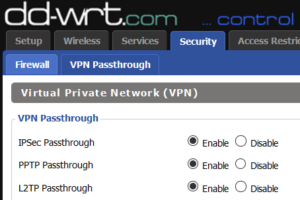
For a long time, I had enabled VPN passthrough with DD-WRT from an IPSEC endpoint running inside the network with the SPI firewall disabled. The VPN was mostly reliable, but every once in a while I would need to reset the tunnel on both sides. I did this until I discovered the magic of enabling the SPI firewall. Just as with a Cisco router, the DD-WRT router needs to inspect the packets to know what to do with IPSEC. So, if you want IPSEC passthrough support, you really should enable both the option in step 1 AND the option in step 2 (below).
When using an ext4 filesystem for MythTV, here are a few tricks to help improve speed. First of all, always create a separate partition for your recordings! Here’s how to ensure that it is optimal. Let’s say that you create a partition on device /dev/sdb. mkfs.ext4 -T largefile /dev/sdb1 tune2fs /dev/sdb1 -o journal\data\writeback echo “/sbin/blockdev –setra 4096 /dev/sdb” >> /etc/rc.local In the first step, we tell ext4 to format tuned to use large files. This reduces the number of inodes, maximizing the available space and (unconfirmed, but hypothesized) minimizing the journal size. In the second step, we enable writeback mode for the filesystem as a default mount option. This is normally not a safe step, but we are only protecting TV content that is already very robust at working in the face of errors. Setting this option allows the OS to write to the disks without 100% lock-step synchronicity. Now add these options to /etc/fstab. nodiratime,noatime This option in the fstab tells...